I Built a Real-Time Collaborative Whiteboard to Understand Stateful Backends
the inspiration
i wanted to learn websockets and realtime communication since a long time. i did a few failed attempts at it too, trying to learn it all by myself. half-assed a few projects and left them to dust last year. well, this year i have nothing to do apart from maxxing my skills, so i got back to learning websockets, stateful backends, and this time i decided that i will do it by building something bigger than a simple chat app so i will have more motivation.
well then, after doing some googling / and talking to gpt, the project i decided to build was a realtime collaboration whiteboard. well, i think if you have read my last few blogs, you definitely know how big a fan i am of Excalidraw as a tool, so i decided to build this.
throughout this blog, i will go through the entire mental modeling, code, architecture, and everything related to it.
why websockets
the first thing about understanding this is to understand why we need websockets to begin with. because if most of the internet runs on the HTTP protocol, then why do we need websockets for this case? well, from what i understood, yes, we can still use HTTP for this, but the issue is HTTP is a stateless protocol and works on a request and response cycle. that means once the response comes from the server to the client, that partiular request will be closed and thus it's a non-persistent connection.
another thing is that in case of an HTTP server, the server can't push an event / data to the client. it's dependent on the client to ask for the information first through a request in order to send the information.

now, to make sure the events are pushed even with an HTTP architecture, the workaround is long polling.
long polling
Long polling is basically a way for the client to get near real-time updates from the server without constantly spamming it with requests.
Instead of the client asking “anything new?” every few seconds, it sends a request and the server keeps that request open until there’s actually something new to send back. Once the server responds, the client immediately makes another request and waits again.
So it’s kinda like:
Client: “Anything new?”
Server: “Nothing yet… hang on.”
some event happens
Server: “Yep, here’s the update.”
Client: “Cool, asking again.”
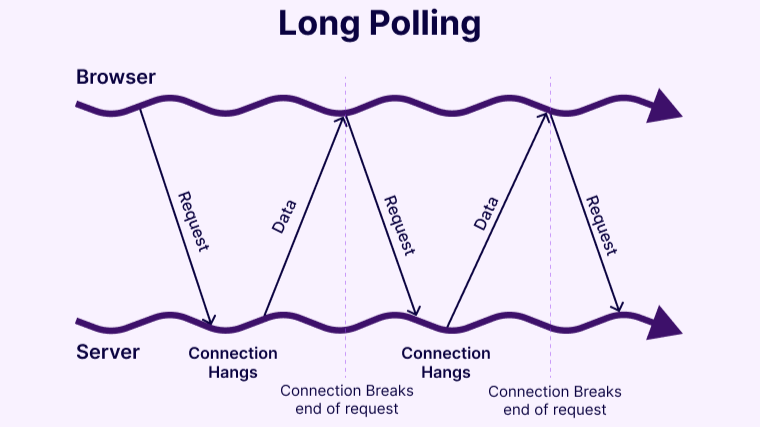
Long polling can give you a pretty decent “real-time” experience, but it’s still not a great choice for actual real-time applications.
You’re basically keeping HTTP requests open for long periods and then creating a new request every time one finishes. With a lot of users, this means a ton of connections being opened, closed, and recreated constantly.
It also adds unnecessary overhead and makes things more complicated to manage at scale. And while it works fine for things like occasional notifications or updates, it starts becoming inefficient when you need frequent, low-latency, two-way communication.
For something like a real-time collaborative whiteboard, where multiple users can constantly send and receive changes, WebSockets are a much better fit because you get a persistent connection where both the client and server can send data whenever they need to.
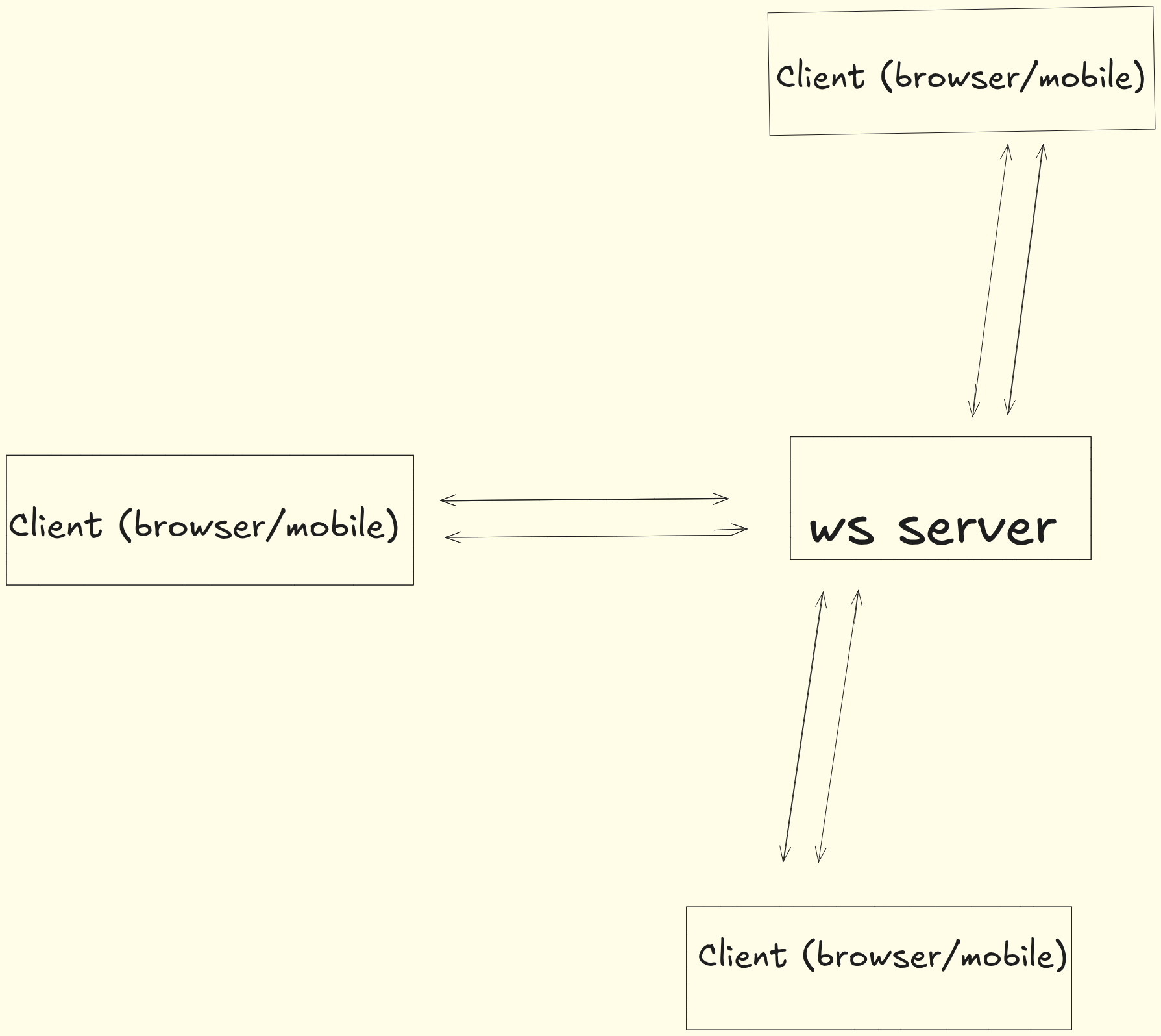
WebSockets are basically a persistent, two-way connection between the client and the server.
Unlike normal HTTP requests, you don’t have to keep asking the server, “hey, anything new?”. Once the WebSocket connection is established, it stays open, and both the client and server can send data whenever they want.
This is called full-duplex communication. The client can send something to the server while the server can simultaneously send something back, without waiting for another request.
There’s also no polling involved. The server can simply push an update to the client as soon as something happens.
This is especially useful for things like chat apps, multiplayer games, live dashboards, and collaborative tools. In my whiteboard, for example, when one user moves or creates a shape, the server can immediately broadcast that change to everyone else connected to the room.
The biggest benefit is lower latency. Instead of waiting for the client to make another request, updates can be pushed instantly over the already-open connection.
i think that gives a good overview behind the decision to choose websockets over HTTP and their differences and why to choose websockets over HTTP here.
btw, this doesn't mean we haven't used an HTTP server at all. i have, but not for realtime communication, but for a few different use cases. you will know as you read the project structure and architecture.
the project structure and architecture is fairly simple and complicated at the same time, depending on how much experience you carry. for me, setting this up taught me a lot of things, especially because i never used a monorepo (turborepo) before, so figuring it out was a bit of a task in the beginning. even though by the time i'm writing this blog, that part is no longer difficult.
okie, now coming to the project structure. here i chose to go with a monorepo (turborepo) for this project for various reasons, but for the most part, i wanted to set it up and know how it actually works. so, for the sake of learning as a priority, i used it.
this monorepo will have a few packages and a few apps in it. i won't explain those things in this blog.
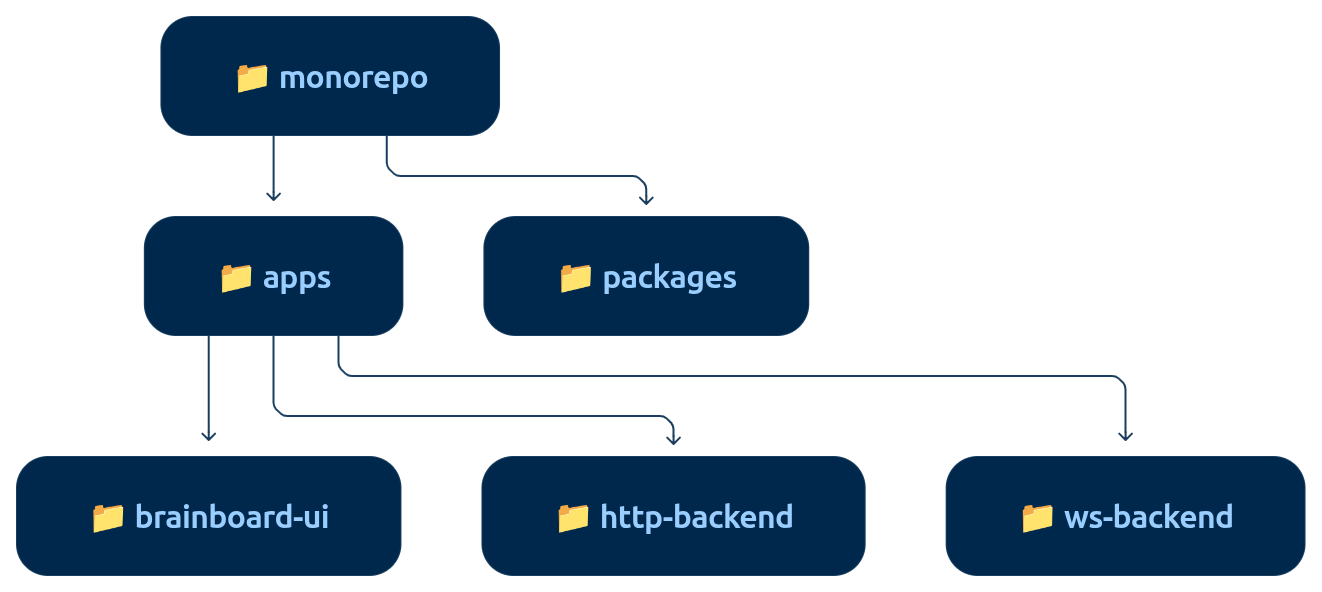
the above is the folder structure i used.
now coming to the architecture, it's fairly simple. i have one HTTP server and one WebSocket server and a React (Next.js) UI with it. now you must be wondering why i have 2 separate backends when i could write both the HTTP and WebSocket implementation in one backend. but the reason to have 2 backends is scalability!
you see, scaling HTTP backends is fairly simple, but when it comes to scaling WebSocket servers, it can get dirty and complicated. and here in this case, most of the load will be taken by the WS server anyways because most of the interaction will happen with it. and even if the HTTP backend gets the load, i can simply scale it up or down as per the need without also dealing with the WebSocket scaling mess.
i am separating them both for this reason and also for the simplicity of deployment.
tech stack
lets talk about the tech stack in a few words. the tech stack used here is fairly simple, i would say. it's:
Next.js
ws
ExpressJS
PostgreSQL
Prisma ORM
everything is fairly self-explanatory here, i assume, so i won't be describing it much. you will understand it (if you don't) by seeing the architecture diagram below.
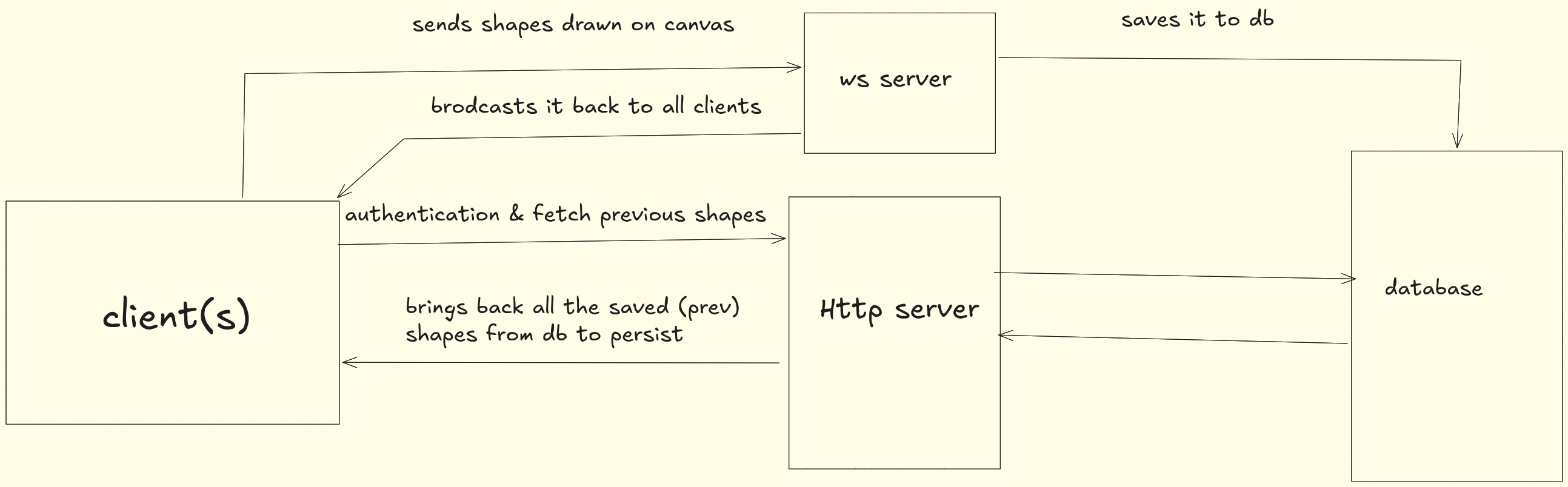
architecture diagram
the above is the fairly roughly done architecture of the Brainboard app, with maximum explanation i could put in the diagram. lets understand what's happening in it.
there are roughly 4 main services in this architecture: the client (UI), HTTP server, WebSocket server, and the database.
to begin with, ofc the client or UI is the one which is user-facing and the user will ofc interact with it.
now, when the user does something, the first thing that happens is a "draw" type request being sent to the WebSocket (WS) server. now, what the server does is basically 2 things:
it broadcasts the same shape received from the canvas (from the UI) to all the clients connected to the same room.
it then saves those shapes to the database so they persist even after the session ends.
the HTTP layer here is responsible for 2 things:
to authenticate the user. once they are authenticated, they can create their own room or join an existing room to start drawing.
to fetch all the previously drawn shapes from the DB and show them on the whiteboard.
now, before all of this happens, you must be wondering how the client actually got into the room and how we know which clients are in which room.
i mean, a lot of questions, right?
i had those questions too!
this is where the concept of a stateful backend or maintaining a state in your server comes from, and i will show you it through code.
what is state?
state is basically information that the application needs to remember.
for example, in a whiteboard app, the server might need to remember:
which users are connected
which users are in which room
what room a particular WebSocket connection belongs to
potentially the current state of the whiteboard
if the server has to remember something between requests/messages, that's state.
what is a stateful backend?
a stateful backend is a backend that keeps track of information about its current clients or sessions instead of treating every request as completely independent.
in our WebSocket example, the important part is:
const rooms = new Map();
we're keeping the connected WebSocket clients in memory on the server.
when someone joins:
if (!rooms.has(roomId)) {
  rooms.set(roomId, new Set());
}

rooms.get(roomId).add(ws);
ws.roomId = roomId;
now the server remembers:
this WebSocket connection belongs to room-123.
so later, when that client sends a draw event:
const clients = rooms.get(ws.roomId);
the server already knows which room they're in and can find all the other connected clients:
for (const client of clients) {
  if (client !== ws) {
    client.send(...);
  }
}
that's the stateful part.
the server is maintaining a live representation of the system:
Server State

rooms
 ├── room-123
 │    ├── User A's WebSocket
 │    ├── User B's WebSocket
 │    └── User C's WebSocket
 │
 └── room-456
      ├── User D's WebSocket
      └── User E's WebSocket
when User A sends a draw message, the server doesn't need User A to tell it who else should receive it. the server already knows because it has maintained that state.
that's fundamentally different from a simple stateless HTTP API, where each request can generally be handled independently:
HTTP request
     ↓
Server handles it
     ↓
Response
     ↓
Done
with our WebSocket backend:
User connects
     ↓
Server remembers connection
     ↓
User joins room
     ↓
Server remembers room membership
     ↓
User sends "draw"
     ↓
Server looks at its state
     ↓
Broadcasts to everyone in that room
the full code implementation:
// Join a room
if (data.type === "join_room") {
  const { roomId } = data;

  if (!rooms.has(roomId)) {
    rooms.set(roomId, new Set());
  }

  rooms.get(roomId).add(ws);
  ws.roomId = roomId;

  return;
}

// Handle drawing
if (data.type === "draw") {
  const clients = rooms.get(ws.roomId);

  for (const client of clients) {
    if (
      client !== ws &&
      client.readyState === WebSocket.OPEN
    ) {
      client.send(
        JSON.stringify({
          type: "draw",
          data: data.data,
        })
      );
    }
  }
}
now i will take you through the schemas of my app, so you can see how i'm saving the shapes and rooms and the entire DB design. it's fairly simple, i would say.
model User {
  id        String   @id @default(cuid())
  name      String
  username  String   @unique
  email     String   @unique
  password  String
  createdAt DateTime @default(now())
  updatedAt DateTime @updatedAt
  rooms     Room[]
}

model Room {
  id        Int      @id @default(autoincrement())
  slug      String   @unique
  createdAt DateTime @default(now())
  adminId   String
  admin     User     @relation(fields: [adminId], references: [id])
  shapes    Shape[]
}

model Shape {
  id     Int    @id @default(autoincrement())
  roomId Int
  userId String
  name   String
  data   Json

  room Room @relation(fields: [roomId], references: [id])
}
yes, i have written it with Prisma instead of raw SQL to save my soul.
the database structure is pretty straightforward. we have 3 main models: User, Room, and Shape.
a User can create multiple rooms, while each Room has one admin who owns it. the adminId in the Room model connects it back to the User. then we have Shape, which belongs to both a room and a user. so whenever someone draws something, we store the roomId to know which whiteboard it belongs to, the userId to know who created it, and the actual drawing data inside the data JSON field.
so the relationship is basically:
User → Rooms → Shapes
this lets us fetch all the shapes belonging to a room and recreate the whiteboard whenever someone joins, while also keeping track of who created each shape.
i think thats about this blog , thats what came to my mind while writing .